
Mysql 的基本使用
海边的小溪鱼 2017-07-14 Mysql
MySQL 是最流行的关系型数据库管理系统
# 数据库操作
# 1. 创建数据库:create database 数据库名;
# 2. 查看 mysql 中有哪些数据库:show databases;
# 3. 查看当前使用的是哪个数据库:select database();
# 4. 选择数据库:use 数据库名;
# 5. 查看数据库中所有的表:show tables;
# 6. 删除数据库:drop database 数据库名;
# 7. 修改数据库的属性:alter database 数据库名 charset utf8;
# 8. 导入备份的数据库:source 路径/xxx.sql
# SQL 语句:DML(对表中的数据进行增删改查)
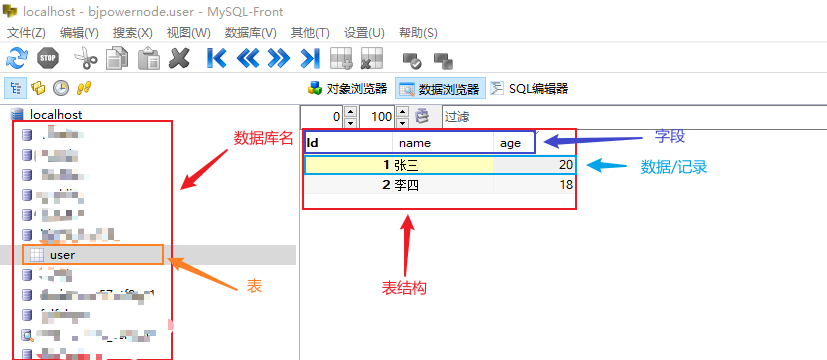
# 1. 增(insert into)—— 添加数据
语法格式:INSERT INTO 表名 (字段名1, 字段名2, ...) VALUES(值1, 值2, ...);
# 给 表中 指定的字段名 添加数据
insert into user (id, name, age) values(3, "张三", 21);

# 给 表中 指定的字段名 添加多条数据
insert into user (id, name, age) values(4, "李四", 20),(5, "王五", 18);

# 若不指定字段名,则 添加的值 的顺序 应和 字段在表中的顺序完全一致
insert into user values(3, "张三", 19);
1
2
3
4
5
6
7
8
2
3
4
5
6
7
8
# 2. 删(delete)—— 删除数据
语法格式:DELETE FROM 表名 WHERE 条件表达式;
# 删除 表中 某一条数据/记录
delete from user where id=3;

# 清空表:若不使用 where 子句,则会删除表中所有的数据/记录
delete from user;
1
2
3
4
5
2
3
4
5
# 3. 改(update)—— 修改数据
语法格式:UPDATE 表名 SET 字段名1=值1 WHERE 条件表达式;
# 修改 表中 某个/多个字段 的数据,多个字段用逗号隔开
update user set name="ZhangSan", age=18 where id=1;

# 若不使用 where 子句,则会将表中所有记录的指定字段都进行更新
update user set name="WangWu";
1
2
3
4
5
2
3
4
5
# 4. 查(select)—— 查询数据
SELECT * FROM 表名;(查询所有字段,使用*通配符表示所有字段)SELECT 字段名1,字段名2,… FROM 表名(查询指定的部分字段)SELECT 字段名1,字段名2,… FROM 表名 WHERE 条件表达式;(where 子句 条件表达式如下:)where 字段名1 = 值1表示,字段值为XXXwhere 字段名 in (1,2,3)表示,字段值为1,2,3where 字段名 between 2 and 5表示,字段值 在 2~5之间where 字段名 is null或者where 字段名 is not null表示,字段值为空/不为空where 字段名 like或者where 字段名 like表示,字段值where id < 5 and age = '20'表示,字段值必须满足这两个条件where id < 5 or age = '20'表示,字段值满足其中一个条件
# 查询表中所有的数据
select * from user

# 查询表中指定字段的数据
select name,age from user;

# 查询 id 值大于4 的数据/记录
select * from user where id > 4;

# 查询 id 值为 1 或 2 或 3 的数据/记录
select * from user where id in (1,2,3);

# 带 BETWEEN AND  关键字的查询(从...到...之间的范围)
select id,name from user where id between 2 and 5; // 查询 id 值为2~5之间的数据/记录

# 查询 字段值为 空 的数据/记录
select id,name from user where name is null;

# LIKE 关键字 查询(注意:NOT LIKE 相反)
#(1)百分号(%)通配符:匹配任意长度的字符串,包括空字符串
select id,name from user where name like "Z%"; # 查询 字段值首字母为 Z 的数据/记录
select id,name from user where name like "%n"; # 查询 字段值尾字母为 n 的数据/记录
select id,name from user where name like "Z%n"; # 查询 字段值 以Z开头n结尾 的数据/记录
#(2)下划线(_)通配符:下划线通配符只匹配单个字符,若要匹配多个字符,需要使用多个下划线通配符
select id,name from user where name like "Zhan_San"; # 以“Zhan”开始,以“San”结束
select * from user where age like "_0"; # 查询 age字段的值(两个字符长度) 以“0”结束

# 总结:where 更多的条件表达式
SELECT id,name FROM student2 WHERE id<5 AND age='20'; # 必须满足 id<5 和 age=20 的两个条件
SELECT id,name FROM student2 WHERE id<5 OR age='20'; # 满足其中一个

注意:OR 和 AND 一起使用的时候,AND 的优先级高于 OR,因此二者一起使用时,
会先运算 AND 两边的表达式,再运算 OR 两边的表达式
1
2
3
4
5
6
7
8
9
10
11
12
13
14
15
16
17
18
19
20
21
22
23
24
25
26
27
28
29
30
31
32
33
2
3
4
5
6
7
8
9
10
11
12
13
14
15
16
17
18
19
20
21
22
23
24
25
26
27
28
29
30
31
32
33
# 查询表中所有的数据,并按照 age 字段进行升序排列(按照 age 从小到大排列)
select * from user order by age asc; -- asc 可以省略不写

# 查询表中所有的数据,并按照 age 字段进行降序排列(按照 age 从大到小排列)
select * from user order by age desc;

# 查询表中所有的数据,先按照 age 字段进行降序排列,再按照 name 字段进行降序排序
select * from user order by age desc, name asc
1
2
3
4
5
6
7
8
2
3
4
5
6
7
8
# 查询 user 表中,age 为 18 的总数据条数(返回的时数值,总条数)
select count(*) from user where age=18

# 使用 as 关键字给 字段起别名
select count(*) as total from user where age=18
select name as username, age as nl from user -- 将 name 和 age 起个别名
1
2
3
4
5
6
2
3
4
5
6