
Vue 组件间的通信方式
海边的小溪鱼 2022-07-14 Vue2
父向子传值(props)、子向父传值($emit)、兄弟间组件传值(eventBus)、等
# JavaScript 教程
# 1. 父向子传值(props)
- 父组件:使用 自定义属性,来传递数据
- 子组件:通过 props 接收父组件传递过来的数据
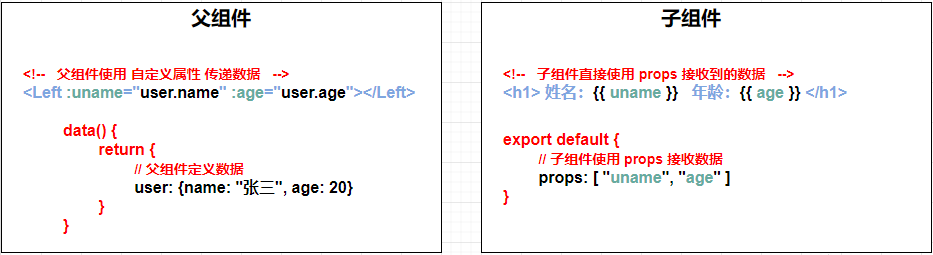
注意:props 接收到的数据是只读的
若想修改 props 接收到的数据,可以把接收到的数据转存到 data 中
# 2. 子向父传值($emit)
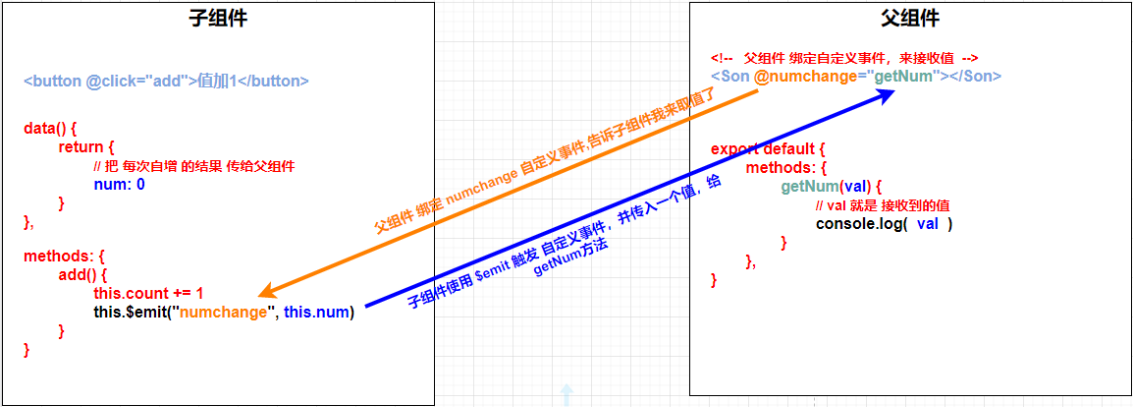
- 子组件:使用 $emit("自定义事件名", 参数),来触发父组件中的自定义事件,并传递一个值
- 父组件:绑定 自定义事件来接收值,如:<Son @自定义事件名="getNum">
# 3. 兄弟间传值(eventBus)
- 在 项目根目录下 创建 eventBus.js 文件(事件总线)并向外共享一个 Vue的实例对象
// eventBus.js 文件

import Vue from "vue"

// 向外共享 Vue 的实例对象
export default new Vue()
1
2
3
4
5
6
2
3
4
5
6
- 收发方 均导入 eventBus.js 文件
- 在数据发送方,调用 bus.$emit("事件名称", 要发送的数据) 方法触发自定义事件
- 在数据接收方,调用 bus.$on("事件名称", 事件处理函数) 方法注册一个自定义事件。
- 注意:$emit()是一个存的过程,$on()是一个取出来的过程,存和取的自定义事件名称要一致
<!-- Left组件(数据发送方) -->
<template>
    <div class="box-left">
        <h3>我是Left.vue组件(数据发送方)</h3>
        <button @click="sendMsg">发送</button>
    </div>
</template>
<script>
import bus from "./eventBus.js" // 导入 eventBus.js 模块
export default {
	data() {
	    return {
	        msg: "Hello World" // 将要把数据 传给 Right.vue 组件
	    }
	},
	methods: {
        sendMsg() {
            bus.$emit("share", this.msg)
            // 语法格式: $emit("自定义事件名称", 参数)
			// 通过 $emit() 触发 Right 组件的自定义事件,并传递一个参数
        }
	}
}
</script>
1
2
3
4
5
6
7
8
9
10
11
12
13
14
15
16
17
18
19
20
21
22
23
24
2
3
4
5
6
7
8
9
10
11
12
13
14
15
16
17
18
19
20
21
22
23
24
<!-- Right组件(数据接收方) -->
<template>
    <div class="box-right">
        <h3>我是Right.vue组件(数据接收方)</h3>
		<p>接收到的数据是:{{msgFromLeft}}</p>
    </div>
</template>
<script>
import bus from "./eventBus.js" // 导入 eventBus.js 模块
export default {
	data() {
		return {
			msgFromLeft: "" // 用于转存其他组件传递过来的数据
		}
	},
    created() {
        // 给 bus 绑定share自定义事件,事件被触发后调用这个箭头函数
        bus.$on("share", val => {
            this.msgFromLeft = val // 把 val 接收到的数据 转存到 msgFromLeft
        })
    }
</script>
1
2
3
4
5
6
7
8
9
10
11
12
13
14
15
16
17
18
19
20
21
22
2
3
4
5
6
7
8
9
10
11
12
13
14
15
16
17
18
19
20
21
22
# 父向子传值的其它方式(子组件获取父组件中的数据)
1. 子组件中使用 $parent 获取父组件中的数据和方法
// 父组件
<script>
export default {
    data() {
        return {
            msg: "你好"
        }
    },
    methods: {
        add() {
            console.log("触发了");
        }
    },
};
</script>

// 子组件
<script>
export default {
    created() {
        // 通过 $parent 获取父组件中的数据
        console.log(this.$parent.msg);

        // 通过 $parent 触发父组件中的方法
        this.$parent.add();
    },
};
</script>
1
2
3
4
5
6
7
8
9
10
11
12
13
14
15
16
17
18
19
20
21
22
23
24
25
26
27
28
2
3
4
5
6
7
8
9
10
11
12
13
14
15
16
17
18
19
20
21
22
23
24
25
26
27
28
2. 使用 provide 和 inject 获取父组件中的数据和方法
// 父组件(通过 provide 暴露属性和方法)
<script>
export default {
    provide: function() { // 暴露属性和方法
        return {
            message: this.msg,
            add: this.add
        }
    }
};
</script>

// 子组件(通过 inject 接收属性和方法)
<template>
    <div class="hello">
        <h2>{{ message }}</h2>
    </div>
</template>
<script>
export default {
    inject: ["message", "add"], // 接收属性和方法
    created() {
        this.add()
    }
};
</script>
1
2
3
4
5
6
7
8
9
10
11
12
13
14
15
16
17
18
19
20
21
22
23
24
25
26
2
3
4
5
6
7
8
9
10
11
12
13
14
15
16
17
18
19
20
21
22
23
24
25
26
# 子向父传值的其它方式(父组件获取子组件中的数据)
1. 父组件中使用 $children 获取子组件中的数据和方法
// 父组件
<script>
export default {
    mounted() {
        // 通过 $children 获取子组件中的数据
        console.log(this.$children[0].msg);

        // 通过 $children 触发子组件中的方法
        this.$children[0].add()
    }
};
</script>

// 子组件
<script>
export default {
    data() {
        return {
            msg: "hello"
        }
    },
    methods: {
        add() {
            console.log("触发了");
        }
    }
};
</script>
1
2
3
4
5
6
7
8
9
10
11
12
13
14
15
16
17
18
19
20
21
22
23
24
25
26
27
28
2
3
4
5
6
7
8
9
10
11
12
13
14
15
16
17
18
19
20
21
22
23
24
25
26
27
28
2. 父组件中使用 $refs 获取子组件中的数据和方法
// 父组件
<template>
    <div id="app">
        <HelloWorld ref="getData"/>
    </div>
</template>
<script>
import HelloWorld from "./components/HelloWorld.vue";
export default {
    components: {
        HelloWorld,
    },
    mounted() {
        // 通过 $refs 获取子组件中的数据
        console.log(this.$refs.getData.msg);

        // 通过 $refs 触发子组件中的方法
        this.$refs.getData.add()
    }
};
</script>
1
2
3
4
5
6
7
8
9
10
11
12
13
14
15
16
17
18
19
20
21
2
3
4
5
6
7
8
9
10
11
12
13
14
15
16
17
18
19
20
21
# 更多传值方式
1. 作用域插槽
// 父组件
<template>
    <div id="app">
        <HelloWorld>
            <template #hello="scope">
                <span>{{ scope.msg }}</span>
            </template>
        </HelloWorld>
    </div>
</template>

// 子组件
<template>
    <div class="hello">
        <slot name="hello" msg="你好"></slot>
    </div>
</template>
1
2
3
4
5
6
7
8
9
10
11
12
13
14
15
16
17
2
3
4
5
6
7
8
9
10
11
12
13
14
15
16
17
2. localStorage 和 sessionStorage
// 将数据存储到本地
var obj = { name: "张三", age: 18 }
localStorage.setItem("userInfo", JSON.stringify(obj))

// 获取本地存储的数据
var user = JSON.parse(localStorage.getItem("userInfo"))
console.log(user.name);
1
2
3
4
5
6
7
2
3
4
5
6
7
3. 路由传参(query 和 params)
4. Vuex 状态管理