
路由传参(实现页面跳转)
海边的小溪鱼 2022-07-14 Vue2vue-router
路由传参的几种方式:query、params、等
# 实现页面跳转的方式
(1)声明式导航:通过 点击链接 实现页面跳转
<template>
    <div class="videoInfo">
        <!-- 不携带参数 -->
        <router-link to="/player">跳转至播放页</router-link>
        <router-link :to="{ name: 'player' }">跳转至播放页(路由规则中需有 name 属性)</router-link>
        <router-link :to="{ path: '/player' }">跳转至播放页</router-link>
        <!-- 携带参数 -->
        <router-link :to="{ name: 'player', params: {id: 2} }">跳转至播放页</router-link>
    </div>
</template>
1
2
3
4
5
6
7
8
9
10
2
3
4
5
6
7
8
9
10
(2)编程式导航:通过 api 实现页面跳转
<template>
    <div class="videoInfo">
        <button class="video" @click="toPath">跳转至播放页</button>
    </div>
</template>

<script>
export default {
    methods: {
        // 默认窗口打开
        toPath() {
            this.$router.push({
                name: "player",
            });
        },
        // 新窗口打开
        toPath() {
            const { href } = this.$router.resolve({
                name: "player",
            });
            window.open(href, "_blank")
        }
    },
};
</script>
1
2
3
4
5
6
7
8
9
10
11
12
13
14
15
16
17
18
19
20
21
22
23
24
25
2
3
4
5
6
7
8
9
10
11
12
13
14
15
16
17
18
19
20
21
22
23
24
25
- 路由规则如下
{ path: "/player", component: Player, name: "player" }
1
# 1. query 和 params 传参/接收参数
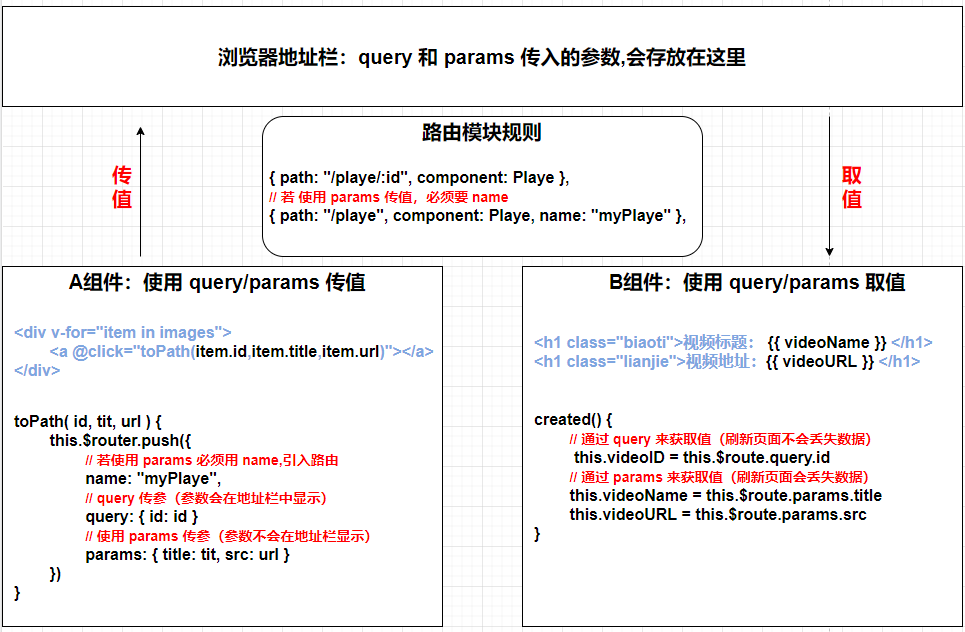
// 视频列表页(使用 query/params 传递参数)
<template>
    <div class="videoInfo">
        <button class="video"
            v-for="item in videoList" :key="item.id"
            @click="toPath(item.id, item.title, item.video_url)">
            {{item.title}}
        </button>
    </div>
</template>
<script>
export default {
    data() {
        return {
            videoList: [
                { id: 1, title: "视频1", video_url: "视频链接" },
                { id: 2, title: "视频2", video_url: "视频链接" },
                { id: 3, title: "视频3", video_url: "视频链接" },
            ]
        }
    },
    methods: {
        toPath(id, title, url) {
            this.$router.push({
                name: "player",
                // query 传参:参数会在地址栏中显示(刷新页面,数据不会丢失)
                query: {
                    id: id,
                },
                // params 传参:参数不会在地址栏中显示(刷新页面,数据会丢失)
                params: {
                    title: title,
                    video_url: url
                },
            });
        }
    },
};
</script>

// 播放页(使用 query/params 接收参数)
<script>
export default {
    data() {
        return {
            id: "",
            title: "",
            video_url: ""
        }
    },
    created() {
        // query 接收参数
        this.id = this.$route.query.id
        // params 接收参数
        this.title = this.$route.params.title
        this.video_url = this.$route.params.video_url
    }
}
</script>
1
2
3
4
5
6
7
8
9
10
11
12
13
14
15
16
17
18
19
20
21
22
23
24
25
26
27
28
29
30
31
32
33
34
35
36
37
38
39
40
41
42
43
44
45
46
47
48
49
50
51
52
53
54
55
56
57
58
59
2
3
4
5
6
7
8
9
10
11
12
13
14
15
16
17
18
19
20
21
22
23
24
25
26
27
28
29
30
31
32
33
34
35
36
37
38
39
40
41
42
43
44
45
46
47
48
49
50
51
52
53
54
55
56
57
58
59
# 2. 路由规则开启 props 传参
为路由规则开启 props 传参(刷新页面不会丢失数据)参考 (opens new window)
// 1. props 为 true 时,传递动态参数(在 path 中使用占位符声明接收的 params 参数)
{ path: "/player/:id/:title/:video_url", component: Player, name: "player", props: true },

// 2. props 为 对象 时,传递静态参数(注意:当 props 为对象时,动态的参数就失效了)
{ path: "/player", component: Player, name: "player", props: { id: 1, title: "视频", video_url: "地址" } },

// 3. props 为 函数 时,兼顾静态参数与动态参数(接收一个 route 参数,并且返回一个对象)
{ path: "/player/:id/:title", component: Player, name: "player", props(route) {
    return {
        id: route.params.id, // query 同理
        title: route.params.title, // 传递动态参数(在地址栏中显示)
        video_url: "视频地址" // 传递静态参数(不在地址栏中显示)
    }
} },

// 注意:传递动态参数时,参数会在地址栏中显示;传递静态参数时,参数不会在地址栏中显示
1
2
3
4
5
6
7
8
9
10
11
12
13
14
15
16
2
3
4
5
6
7
8
9
10
11
12
13
14
15
16
// 视频列表页
<script>
export default {
    methods: {
        toPath(id, title, url) {
            this.$router.push({
                name: "player",
                params: {
                    id: id,
                    title: title,
                    video_url: url
                },
            });
        }
    },
};
</script>

// 播放页
<template>
    <div class="player">
        <p>id: {{ id }}</p>
        <p>标题:{{ title }}</p>
        <p>链接:{{ video_url }}</p>
    </div>
</template>

<script>
export default {
    props: ["id", "title","video_url"], // 接收参数,模板中直接渲染
}
</script>
1
2
3
4
5
6
7
8
9
10
11
12
13
14
15
16
17
18
19
20
21
22
23
24
25
26
27
28
29
30
31
32
2
3
4
5
6
7
8
9
10
11
12
13
14
15
16
17
18
19
20
21
22
23
24
25
26
27
28
29
30
31
32
# 3. localStorage、sessionStorage 和 Vuex
在实际开发中,我们既不想让重要的参数暴露在地址栏中,也不想刷新页面会丢失数据,该如何解决?
1. localStorage 和 sessionStorage(将数据存储在本地)
// 视频列表页(local存值)
<script>
export default {
    methods: {
        toPath(id, title, url) {
            this.$router.push({
                name: "player",
                query: {
                    id: id,
                },
            });
            // local 存值:将多个数据存放在浏览器本地(解决刷新页面时数据丢失的问题)
            var obj = { title: title, video_url: url }
            localStorage.setItem("rowData", JSON.stringify(obj))
        }
    },
};
</script>

// 播放页(local取值)
<script>
export default {
    data() {
        return {
            video: "",
        }
    },
    created() {
        // local 取值
        this.video = JSON.parse(localStorage.getItem("rowData"))
    }
}
</script>
1
2
3
4
5
6
7
8
9
10
11
12
13
14
15
16
17
18
19
20
21
22
23
24
25
26
27
28
29
30
31
32
33
2
3
4
5
6
7
8
9
10
11
12
13
14
15
16
17
18
19
20
21
22
23
24
25
26
27
28
29
30
31
32
33
 2. Vuex 状态管理(将数据存储在内存中,且数据是响应式的)Vuex(状态管理)
(1). 安装 vuex 并在 src/store/index.js 中定义全局数据和方法
export default new Vuex.Store({
    // 定义全局数据
    state: {
        videoData: {
            id: "",
            title: "",
            video_url: ""
        }
    },
    // 定义全局方法(用于修改 state 中的数据)
    mutations: {
        edit(state, obj) {
            state.videoData.id = obj.id
            state.videoData.title = obj.title
            state.videoData.video_url = obj.url
        }
    }
})
1
2
3
4
5
6
7
8
9
10
11
12
13
14
15
16
17
18
2
3
4
5
6
7
8
9
10
11
12
13
14
15
16
17
18
(2). 视频列表组件:使用 commit() 来触发 mutations 中的 edit 方法
<script>
export default {
    methods: {
        toPath(id, title, url) {
            this.$router.push({
                name: "player",
                query: {
                    id: id,
                },
            });
            // 使用 commit() 来触发 mutations 中的 edit 方法,并传参
            var obj = { id: id, title: title, url: url }
            this.$store.commit("edit", obj)
        }
    },
};
</script>
1
2
3
4
5
6
7
8
9
10
11
12
13
14
15
16
17
2
3
4
5
6
7
8
9
10
11
12
13
14
15
16
17
(3). 播放页组件:获取 state 中的全局数据
<template>
    <div class="player">
        <!-- 获取 state 中的全局数据 -->
        <p>id: {{ $store.state.videoData.id }}</p>
        <p>标题: {{ $store.state.videoData.title }}</p>
        <p>链接: {{ $store.state.videoData.video_url }}</p>
    </div>
</template>
1
2
3
4
5
6
7
8
2
3
4
5
6
7
8
- 注意:vuex 刷新页面会丢失数据(安装 vuex-persistedstate 让数据持久化,刷新不丢失数据)
(1)npm install vuex-persistedstate@4.1.0 -S
(2)在 src/store/index.js 文件中导入并配置如下
import Vue from "vue"
import Vuex from "vuex"
import createPersistedState from 'vuex-persistedstate' // 持久化,刷新不丢失数据

Vue.use(Vuex)

export default new Vuex.Store({
    state: {},
    mutations: {},
    plugins: [createPersistedState()]
})
1
2
3
4
5
6
7
8
9
10
11
2
3
4
5
6
7
8
9
10
11